
How I keep the same context alive from Claude to Vercel
The five tools I use to take a design idea from research to a live prototype are easy to name. The part that actually makes it work is the context I carry between them, and that part is the skill worth learning.

When designers ask me what my vibe coding setup is, they expect a shopping list. Which editor, which model, which extensions. I used to answer that way, and the answer was never the thing that helped them.
The tools are the easy part. You can have Claude, VS Code, GitHub Copilot, a Figma library, and Vercel all installed by lunchtime, and still produce nothing worth shipping. I know, because that was me for longer than I'd like to admit. I had every app open and a brilliant idea in my head, and somewhere between the research and the prototype the idea quietly leaked out, a little at each step, until what landed on screen was a vague cousin of what I'd set out to build.
So I want to reframe what a setup actually is. A setup is not a collection of tools. It's a relay. The value isn't in any single runner; it's in how cleanly the baton passes from one hand to the next. In a vibe coding workflow, the baton is context: what you're building, who it's for, what you've already learned, and what good looks like. Most designers I speak to are stuck not because they picked the wrong tools, but because the baton keeps hitting the floor between them.
Let me walk you through how I actually move one idea from a blank page to a live link, and where the baton passes each time.
Want the setup, not just the story? The companion to this post is a free Project context starter kit: the exact folder structure, the Copilot-instructions file, and the Claude prompts I use to run this relay. Grab it now and follow along, or read first and pick it up at the end.
1. Claude is where the thinking starts
The thinking never really stops, it carries on later with Copilot in the editor, but it has to start somewhere, and for me that's Claude. I start there and stay longer than feels productive. This is the discovery and ideation stage: synthesising user research, doing the desktop research, pulling the messy inputs into something with a shape. If I've run interviews, the transcripts go here and I ask Claude to help me find the patterns I'm too close to see. If I'm working from a thin brief, this is where I pressure-test it, argue with it, and turn it into a proper product requirements document, a PRD.
The output of this stage is not a vibe. It's documents. A research synthesis. A PRD. A short note on the user I'm designing for. I draft them as actual files, because the next thing I do is the move most people skip.
2. The context lives in the project, not in your head
I take those files out of Claude and into the VS Code project, into a dedicated folder that holds the user context and the project context side by side. Nothing clever. A folder, a handful of markdown files, the brief made durable.
Roughly, it looks like this:
my-project/
├── .github/
│   └── copilot-instructions.md      ← points Copilot at the context folders
├── User context/
│   ├── user-archetypes.md           ← who it's for
│   └── research-insights.md         ← what the research told me
├── Project context/
│   ├── project-context.md           ← what it is, constraints, goals
│   └── prd.md                       ← the plain-English requirements
└── src/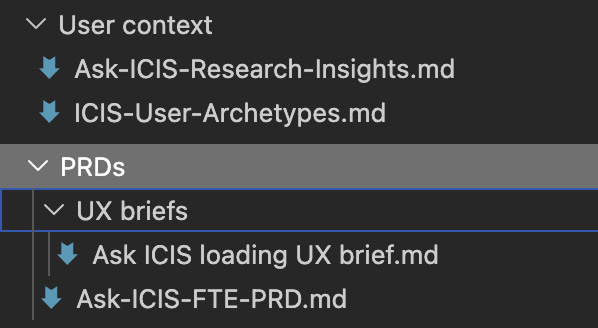
This sounds like admin. It's the most important decision in the whole workflow.
The reason is simple, and it's the thing I used to get wrong. Context that lives only in your head, or only in a chat window you'll close tonight, has to be re-explained to every tool, every session, forever. You become the bottleneck. You spend the first ten minutes of every session reminding the AI what you're building, and you do it slightly differently each time, so the work drifts. Context that lives in the project as files is context you explain once. Every tool that can read the folder inherits it. The baton is no longer in your hand; it's on the track, where the next runner can pick it up without you.
3. Copilot reads the folder, on purpose, every time
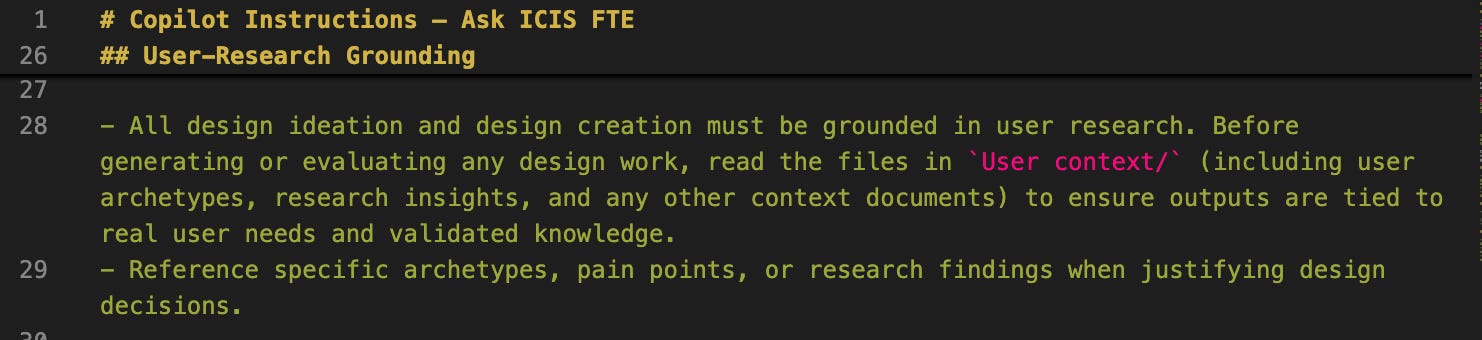
Inside VS Code I use GitHub Copilot, and here is the connective tissue that makes the folder matter: I set up Copilot's instructions so that it always refers to those context files before it does any design ideation.
If you've not done this, Copilot supports a repository instructions file, a small file that tells it how to behave in this project. Mine tells it, before any design work, to ground everything in the user research: read the user-context files first, and justify decisions against real archetypes and findings rather than inventing them. That's it. From then on, I'm not pasting the brief into the chat every time. Copilot already knows it. When I ask for a component or a layout, it answers as something that has read the research, not as a generic assistant meeting my project for the first time.
This is the moment the relay starts to feel like one motion instead of five separate sprints. The work I did in Claude is now the ground Copilot stands on.
4. Decide the stack with Copilot, not before
Only now do I decide what the thing is actually built with: the framework, the structure, the libraries. And I make that decision with Copilot, in conversation, because by this point it has the context to have an opinion worth listening to. Deciding the stack first, before there's a brief to serve, is how you end up with tooling that fights the work. Deciding it here, against a PRD Copilot has already read, means the stack is chosen for the thing, not the thing bent around the stack.
5. Figma MCP, only when the fidelity demands it
If what I'm building needs to be high-fidelity, properly on-brand rather than a rough proof, I connect my Figma design library through MCP, the Model Context Protocol, which is just a standard way of letting a tool read another tool's data. In practice it means Copilot can see my actual design tokens and components, so the prototype matches the brand guidelines instead of approximating them. Figma's own guide walks through enabling it: Guide to the Figma MCP server.
I'm deliberate about the "only when" here. A lot of prototypes don't need this, and reaching for it too early is its own kind of drift, polishing pixels before the idea has earned them. But when fidelity is the point, this is another clean handoff: the brand context passes from Figma into the build without me hand-copying a single hex value.
6. Ship it with Vercel
Then I ship the prototype with Vercel, which turns the project into a live link I can send. This matters more than it looks. A prototype that only runs on my machine isn't really shipped, and an idea nobody can open is an idea nobody can react to. A link you can put in front of someone is what turns the work from a private build into something real.
I do this from the Vercel CLI, which I installed through the CLI too, so deploying is one command in the same VS Code terminal I'm already working in, no context switch to a browser. If you want to wire it up, Vercel's CLI docs cover the install and first deploy. I'll do a proper walkthrough of using VS Code and Vercel together in a later post, so I'll keep this light here: for now, the thing to take is that shipping lives one command away from where you build.
What this is really about
Read that pipeline back and notice what carries through all of it. Claude, VS Code, Copilot, Figma, Vercel: five tools, five logos. But the thing that actually moves from the first step to the last is the context. The research becomes the PRD, the PRD becomes the folder, the folder becomes Copilot's ground, the brand becomes the build, the build becomes a link. None of the tools did that. The handoff did.
So when someone asks for my setup, the honest answer isn't the five tools. It's the discipline of writing the context down once and making every tool refer back to it. That's the skill. It happens to be a skill designers already have, because deciding what to capture, what matters, and what to leave out is just design judgement pointed at your own workflow instead of a user's.
The takeaway artefact
The companion to this post is a free Project context starter kit. It's the part that's hard to copy from prose: the exact folder structure I use for user and project context, a starter Copilot-instructions file you can drop into a project so it always refers to that folder, and the example PRD and context prompts I run in Claude to produce the files in the first place. Clone it, fill in your own project, and you've got the relay set up before your first real prompt.
Something to sit with
You probably already have the five tools, or you can have them by tonight. So the question isn't which to install. It's a smaller, more uncomfortable one: where does your context currently live? If the honest answer is "in my head, and I re-explain it every session", that's the leak. The smallest version of fixing it is one folder, one file, written down once. That's enough to start with this week.